ZBrain is a powerful tool that offers various functionalities designed to enhance personal and professional productivity. Whether you are a student, a professional, or someone looking to optimize daily tasks, understanding what ZBrain is and how to use it can significantly benefit your workflow. This article delves into the intricacies of ZBrain, providing insights on its features and practical applications to maximize its potential.
What Is ZBrain?
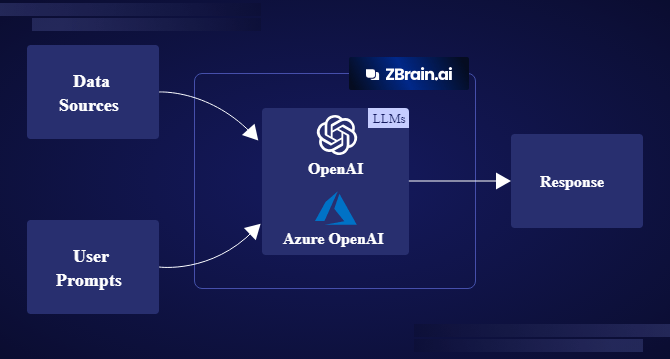
At its core, ZBrain is an advanced software solution that integrates several features aimed at improving cognitive function and organization. It functions primarily as a digital assistant, designed to help users manage their time more effectively, organize their thoughts, and streamline various processes. With capabilities ranging from task management to data analysis, ZBrain is adaptable to a variety of needs.
ZBrain harnesses technology to facilitate better decision-making and efficiency. By utilizing artificial intelligence and machine learning algorithms, ZBrain can analyze user behavior, predict needs, and offer personalized suggestions. This adaptability makes it suitable for both individual and team use, as it can cater to diverse workflows and preferences.
Key Features of ZBrain
To grasp the full potential of ZBrain, it is essential to explore its key features. These functionalities make it a valuable asset in any user’s toolkit.
1. Task Management
One of the primary features of ZBrain is its robust task management system. Users can create, assign, and track tasks seamlessly. The intuitive interface allows for easy categorization and prioritization, ensuring that nothing falls through the cracks. You can set deadlines, reminders, and notifications, which helps maintain focus on critical activities.
2. Note-Taking and Organization
ZBrain includes a comprehensive note-taking system that enables users to jot down ideas, create lists, and store important information. This feature is particularly useful for students and professionals who need to capture information quickly and retrieve it later. Notes can be organized into folders, tagged for easy searching, and even shared with others.
3. Data Analysis and Insights
With advanced data analysis capabilities, ZBrain can help users gain insights into their habits and workflows. By analyzing data trends, it can suggest optimizations, whether for time management or resource allocation. This feature is invaluable for businesses looking to enhance productivity or for individuals seeking personal growth.
4. Collaboration Tools
ZBrain also promotes collaboration among teams through shared workspaces and communication features. Users can collaborate on projects in real time, share documents, and communicate effectively without leaving the platform. This fosters a sense of community and encourages teamwork.
How to Use ZBrain Effectively
Now that you have a clear understanding of what ZBrain is, it’s time to explore how to use it effectively. Implementing ZBrain into your daily routine can transform your productivity levels and help you achieve your goals more efficiently.
Step 1: Set Up Your Account
To begin using ZBrain, the first step is to create an account. This usually involves providing basic information and customizing your profile. During this process, consider what specific features you will need most and tailor your setup accordingly.
Step 2: Familiarize Yourself with the Interface
Take some time to explore the interface of ZBrain. Familiarize yourself with the dashboard, where you can access all functionalities. Understanding how to navigate through different sections will enhance your experience and make it easier to find what you need.
Step 3: Start with Task Management
Begin by inputting your tasks into ZBrain. Start with simple tasks and gradually incorporate more complex projects. Use the categorization and prioritization features to organize your workload. Setting deadlines and reminders will help you stay on track.
Step 4: Utilize the Note-Taking Feature
Make it a habit to take notes within ZBrain. Whether you are in a meeting, attending a lecture, or brainstorming ideas, capture your thoughts in real-time. Organize these notes for easy retrieval later. The tagging system will make searching for specific information effortless.
Step 5: Analyze Your Data
Regularly review the insights generated by ZBrain. Take advantage of the data analysis features to identify patterns in your productivity. This information can help you make informed decisions about how to allocate your time and resources effectively.
Step 6: Collaborate with Others
If you are part of a team, explore the collaboration features in ZBrain. Use shared workspaces to manage group projects efficiently. Communicate through the platform to keep all discussions centralized, ensuring that everyone is on the same page.
Conclusion
In summary, ZBrain is a versatile tool that offers numerous features aimed at enhancing productivity and organization. Understanding what ZBrain is and how to use it can significantly impact your daily routines, whether for personal tasks or professional projects. By utilizing its task management, note-taking, data analysis, and collaboration features, you can streamline your workflow and achieve your goals more efficiently. Embrace ZBrain as your digital assistant, and watch how it transforms the way you work and organize your life.
 New Tech news
Leave a comment